
Auction insights - impression share, overlap, and who’s outranking you - is genuinely useful competitive data, but Google Ads’ API doesn’t expose it at all. The only way to get it is exporting a report from the Google Ads UI itself. This page exists to take that one-time export and turn it into a clean, ranked table instead of a spreadsheet you have to re-read every time.
Where to find it & plan availability
Go to Optimize → Competitors in the left sidebar, or open /dashboard/competitors directly. Viewing the page is free on every plan. Uploading a new file requires your workspace role to be Member or above - Viewers can see the existing table but can’t import a new one.
Step-by-step walkthrough
1. Get the auction-insights file from Google Ads
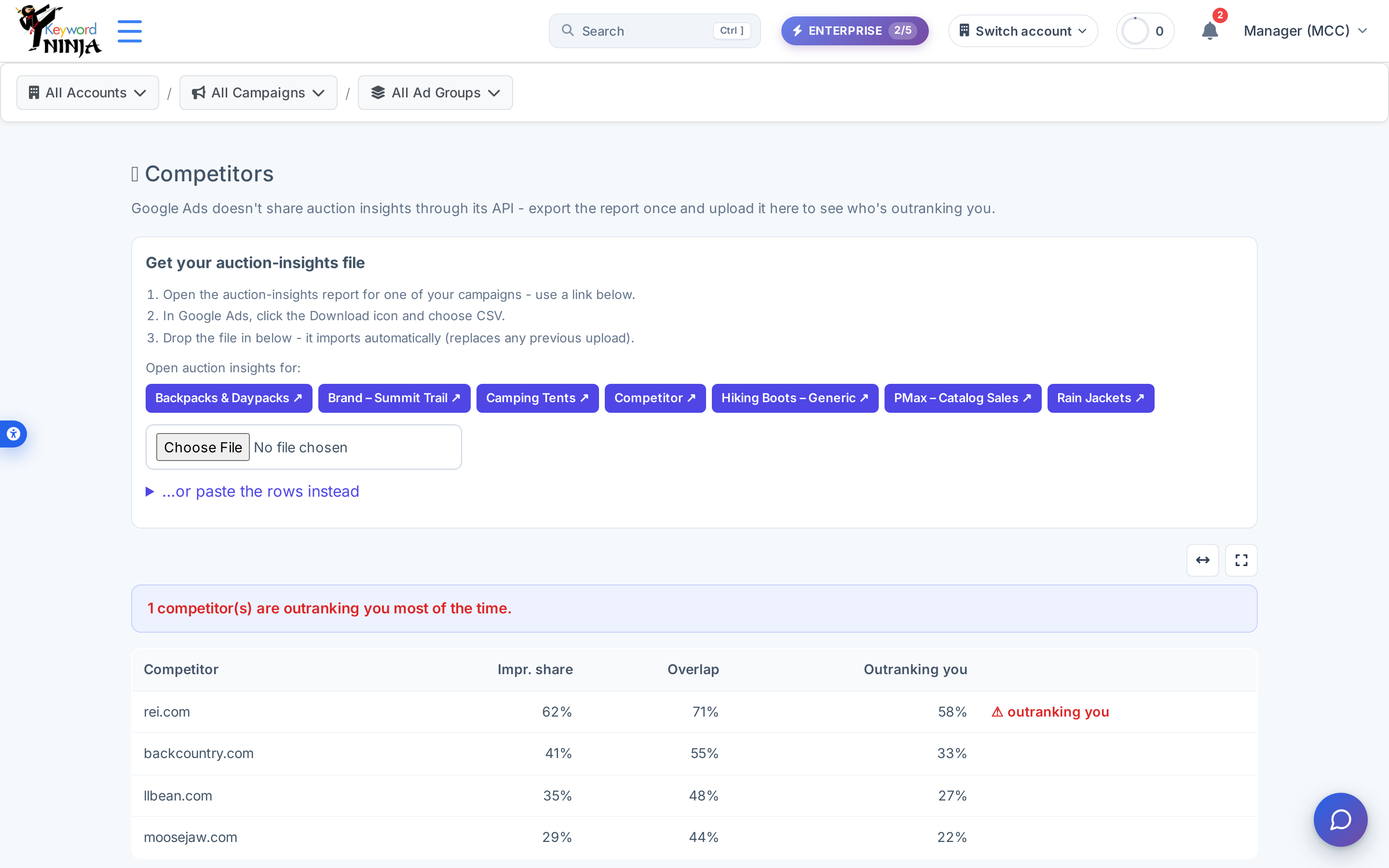
Click one of the campaign buttons under “Open auction insights for:” - each opens that campaign’s real auction-insights report directly in the Google Ads UI (in a new tab, using your own Google login). From there, use Google’s own Download icon and choose CSV.
2. Drop the file in (or paste the rows)
Drag the downloaded file onto the file picker, or expand “…or paste the rows instead” and paste the report’s rows directly as text. Either way, the import replaces any previous upload for the account - there’s no merging or history to manage.
3. Read the table
The table ranks competitors by impression share, and any competitor outranking you more than half the time gets a red “⚠ outranking you” flag plus a one-line summary banner above the table.
Tips & best practices
- This data only updates when you re-upload. Unlike almost every other page in the product, nothing here refreshes automatically - if it’s been a while since your last export, the numbers you’re looking at are stale by definition, not because of a sync delay.
- A bad or empty upload never wipes your existing data. If a file fails to parse into any valid rows, the import is a no-op and your last successful upload stays in place - you’ll never end up staring at an empty table because of a formatting mistake.
- “Outranking you” is a simple, fixed threshold - a competitor showing up in more than half of the auctions ahead of you gets flagged, full stop. It’s not weighted by spend or campaign importance, so use it as a starting point for investigation, not a final verdict.
- The campaign deep-links open Google’s own report, not something rendered inside Keyword Ninja - if a campaign doesn’t have enough auction volume, Google’s report itself may come back mostly empty regardless of what you upload here.
Troubleshooting & FAQ
The page shows “No competitor data yet - upload an auction-insights export above.” That’s the genuine starting state for every account - this data is never auto-populated, so an empty table just means no file has been uploaded yet.
I uploaded a file and nothing changed. Check that the file actually contains competitor domain rows (not just header/footer rows from the export) - a completely unparseable file is treated as “nothing to import” and your previous data (if any) is left untouched.
I don’t see the upload option, just the table. Uploading requires your workspace role to be Member or above; ask a workspace Owner or Admin to change your role if you need to import a new file.
Why doesn’t this refresh from Google Ads automatically like everything else? Google Ads’ reporting API genuinely doesn’t expose auction-insights data - it’s only available through the Ads UI’s own export feature, which is why this page is upload-based rather than sync-based.