Swapping in a new ad and hoping it does better is a guess. RSA A/B Tests makes it a real experiment: pick a control ad, let AI draft a challenger with different headlines and descriptions, create it live in Google Ads yourself, and the tool tracks both ads’ actual performance until one has a statistically meaningful lead.
Where to find it & plan availability
Go to Optimize → RSA Tests in the left sidebar, or open /dashboard/rsa-tests directly. Creating a new test requires a PRO or ENTERPRISE plan and your workspace role to be Member or above; viewing existing tests has no such gate.
Step-by-step walkthrough
1. Pick an ad group and create a test
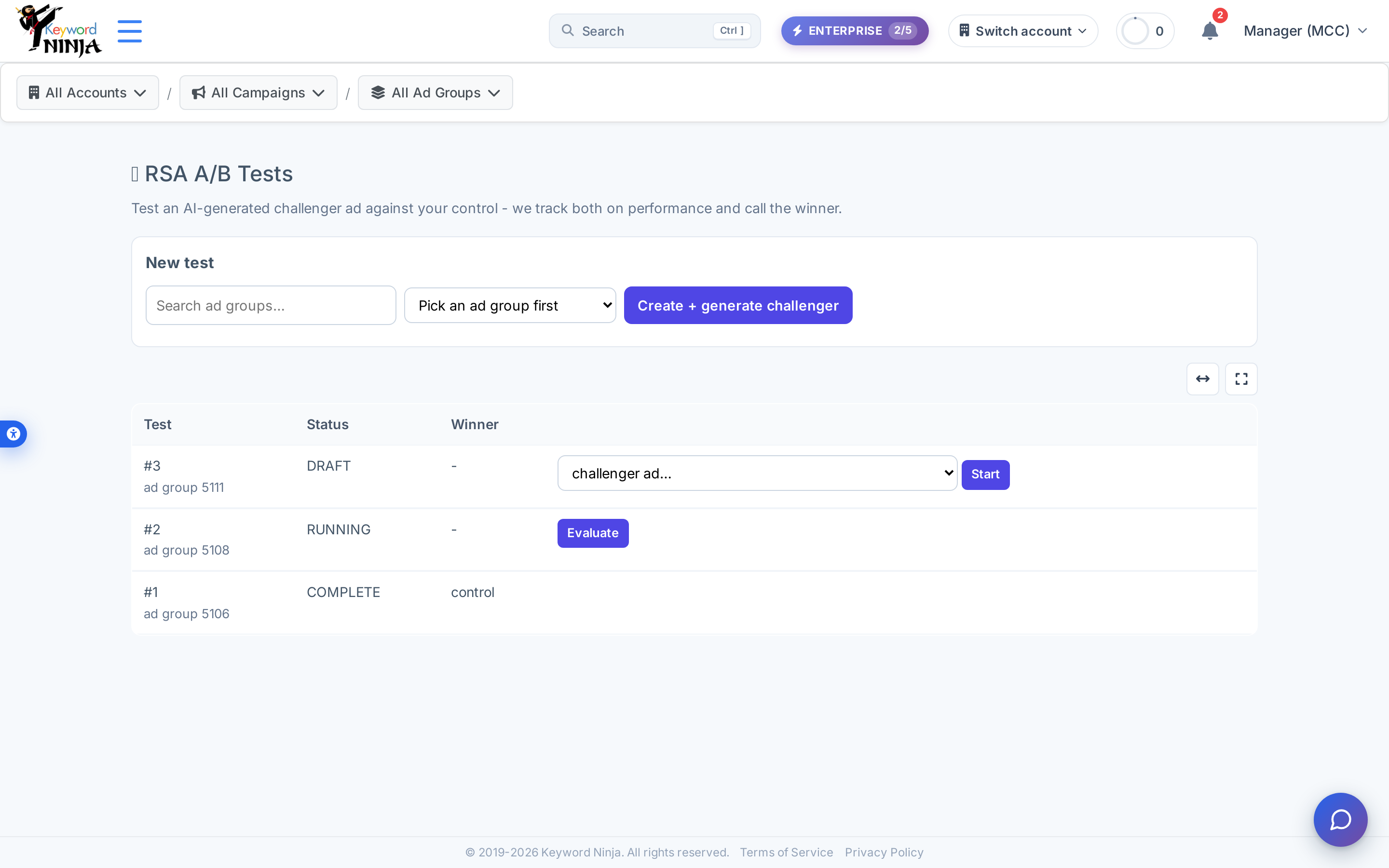
Search for the ad group you want to test, optionally pick which existing ad should be the control, and click Create + generate challenger. This calls AI to draft a full challenger variant (headlines, descriptions, and the reasoning behind the angle) based on that ad group’s keywords and top search terms - it’s a draft only, nothing is created in Google Ads yet.
2. Create the challenger ad in Google Ads, then attach it
Keyword Ninja doesn’t create ads in your account automatically - take the AI draft, build the actual RSA in Google Ads yourself, then come back and pick that new ad from the dropdown next to Start. Clicking Start moves the test from DRAFT to RUNNING and begins tracking both ads from that point forward.
3. Evaluate once there’s enough traffic
Click Evaluate on a running test to check both ads’ performance. The test needs at least 500 impressions on each ad before it will call anything; below that it stays inconclusive rather than guessing early. Once there’s enough data, a clear CTR (or conversion-rate) lead of 10% or more calls a winner and the test moves to COMPLETE.
Tips & best practices
- A test needs real traffic to resolve - there’s no shortcut. If Evaluate keeps coming back inconclusive, the ad group simply hasn’t accumulated 500 impressions per ad yet; check back once it has more volume rather than re-running Evaluate repeatedly.
- The winner threshold is a fixed 10% lift, checked on CTR first and conversion rate as a tiebreaker - it’s a meaningful, deliberately conservative bar, not a coin-flip call on a marginal difference.
- Nothing here pauses the loser or promotes the winner automatically. Once a test completes, acting on the result - pausing the underperforming ad, keeping the winner - is a manual step you take in Google Ads (or via the Ads page in Keyword Ninja).
- Status and winner values (DRAFT/RUNNING/COMPLETE, control/challenger/inconclusive) render as-is regardless of site language - confirmed live on the Hebrew screenshot above. The surrounding labels and buttons are fully bilingual, but these specific values aren’t translated.
- Creating a test is PRO+; watching one run is free. If your plan lapses after you’ve already started a test, you can still view and evaluate it - only creating a new one is gated.
Troubleshooting & FAQ
I clicked Create and got an error instead of a draft. This action requires a PRO or ENTERPRISE plan and workspace Member-or-above role; the error message covers both possibilities.
The AI didn’t generate a challenger draft. Draft generation needs the ad group to have keywords to work from - if it has none, or the AI call fails for any reason, the test is still created in DRAFT status so you can attach a challenger manually once you’ve written one yourself.
Evaluate says inconclusive even though the test has been running a while. Check each ad’s actual impression count - the 500-impression-per-ad floor applies regardless of how much calendar time has passed; a low-traffic ad group can sit below that for a long time.
Why can’t I create the challenger ad directly from this page? Ad creation goes through your normal Google Ads account creation flow by design - this keeps you in full control of exactly what gets published, with the AI draft as a starting point rather than an automatic action.