
Performance Max campaigns don’t have keywords or ad groups the way every other campaign type does - Google’s algorithm handles targeting itself, and the thing you actually control is the creative assets grouped into asset groups. This page is built around that structural difference: instead of keyword-level waste or match-type analysis, it rolls up each PMax campaign’s cost/conversions/ROAS and flags exactly which asset groups have weak ad strength and need more creative variety.
Where to find it & plan availability
Go to Optimize → Performance Max in the left sidebar, or open /dashboard/pmax directly. The page is free on every plan and every workspace role - it’s read-only reporting with nothing to gate.
Step-by-step walkthrough
1. Read the campaign cards
Each card is one PMax campaign, tagged with its account, showing total cost, conversions, and ROAS for the selected window (7/30/90/180 days via the dropdown). Below the summary line is a one-sentence recommendation - either “N asset group(s) have weak ad strength” or “Asset groups look healthy.”
2. Check the asset-group table
Each card’s table lists every asset group in that campaign with its status and Google-assigned ad strength (Poor / Average / Good / Excellent). Poor and Average are highlighted in red - those are the groups actually dragging performance down, since ad strength is Google’s own signal for how well-equipped an asset group is to generate strong combinations of headlines, images, and video.
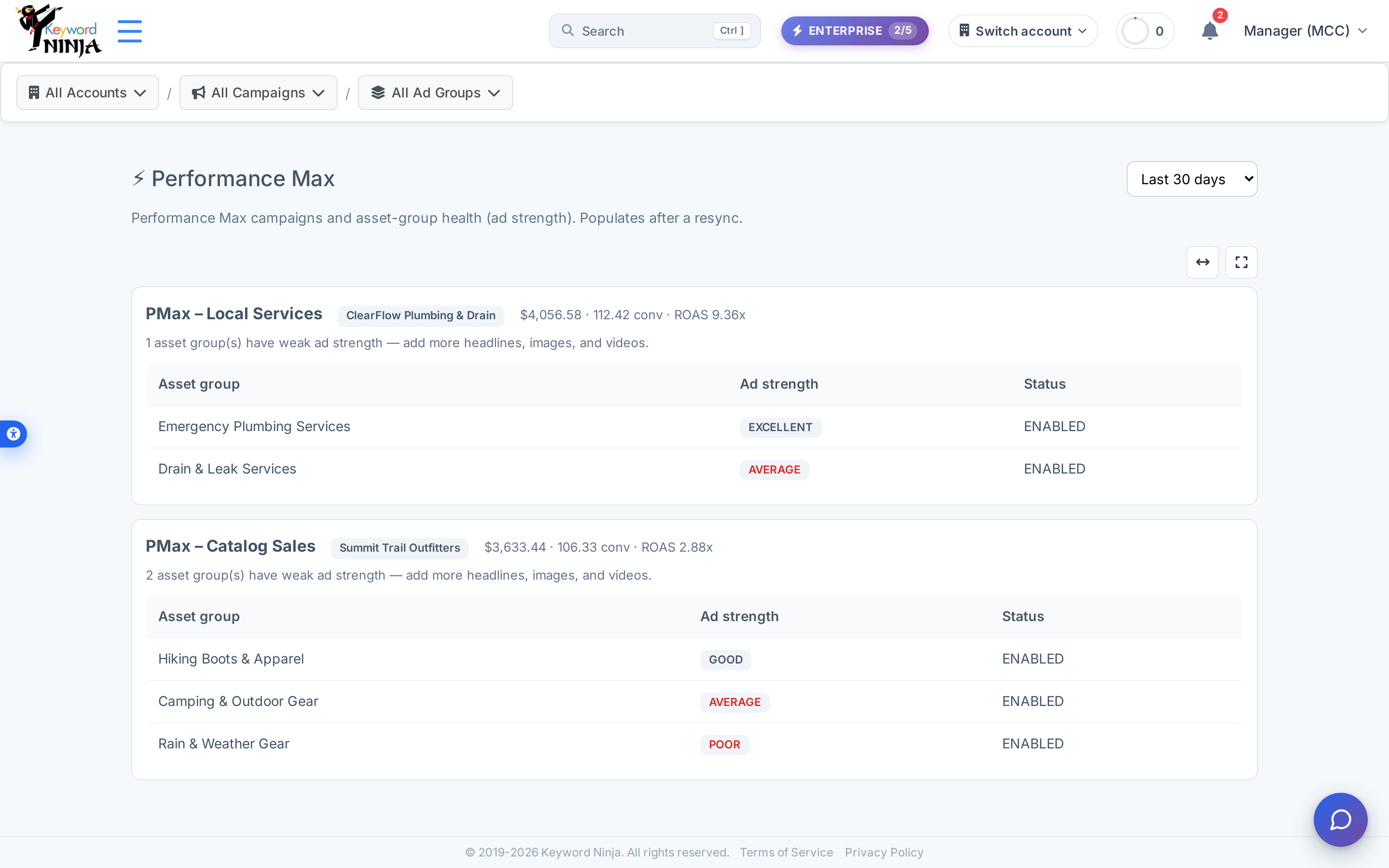
3. Act on the weak groups
There’s no apply button here - this page only diagnoses. For any asset group flagged Poor or Average, go into that asset group in Google Ads (or through Keyword Ninja’s AI Creative tools) and add more headline/description variety, more image formats and aspect ratios, or a video if you don’t have one yet - Performance Max’s own creative-strength meter directly reflects asset diversity.
Tips & best practices
- This is the one page in the product that’s asset-group-native, not keyword-native. If you’re used to reading Keywords, Ad Groups, or Quality Score pages, don’t look for keyword rows here - Performance Max campaigns structurally don’t have them.
- ROAS and CPA here are campaign-wide, not per-asset-group. Google Ads doesn’t expose performance broken down by individual asset group, so you can see which asset group’s creative quality is weak, but not which one is driving the most conversions within a single campaign.
- A “healthy” recommendation doesn’t mean stop improving. It just means no asset group is currently flagged Poor or Average - Good campaigns can still often push toward Excellent with more creative variety.
- This page depends entirely on a Google Ads sync populating PMax data, since Performance Max campaigns generate no keyword-level data to derive anything from locally - if you don’t run any PMax campaigns, this page will simply show none.
Troubleshooting & FAQ
The page shows “No Performance Max campaigns found.” Either the account genuinely doesn’t run any PMax campaigns, or the sync hasn’t pulled Performance Max data yet - a resync should populate it if PMax campaigns exist in the account.
Why can’t I see keyword-level detail for my PMax campaign here? Performance Max campaigns don’t have keywords in Google Ads at all - targeting is fully automated by Google’s algorithm across search, display, YouTube, and more, which is exactly why this page reports at the campaign and asset-group level instead.
I improved an asset group’s creative - why does it still show the same ad strength? Ad strength is Google’s own rating and updates after Google re-evaluates the new assets, which isn’t instant - check back after the change has had time to process, and after a resync in Keyword Ninja.
Can I pause or edit an asset group from this page? No - this page is read-only diagnosis only; asset-group and creative changes are made directly in Google Ads (or via Keyword Ninja’s AI Creative tools for ad copy).