
Quality Score isn’t cosmetic - a low score directly raises what you pay per click for the same ad position. But the 1-10 number by itself doesn’t say why it’s low. Google Ads breaks it into three real components (ad relevance, expected CTR, landing-page experience), and this page pairs your worst-scoring, highest-spending keywords with whichever of those three is actually dragging the score down - plus a specific fix for that exact problem.
Where to find it & plan availability
Go to Optimize → Quality Score in the left sidebar, or open /dashboard/quality-score directly. The page is free on every plan and for every workspace role - it’s read-only, so there’s nothing to gate.
Step-by-step walkthrough
1. Read the table
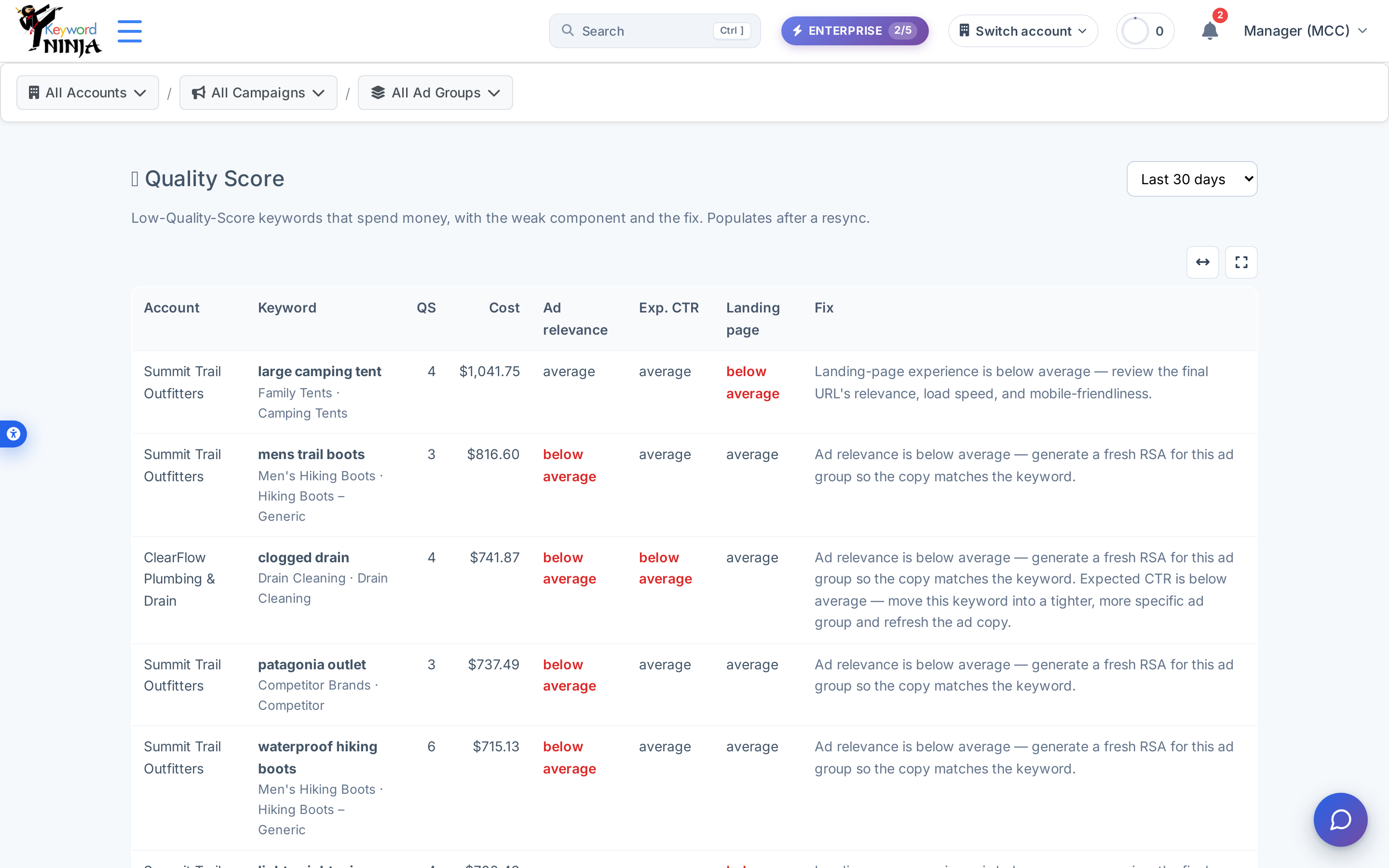
Only keywords with a Quality Score of 6 or below and real spend in the selected window show up here, sorted by cost descending - the keywords costing you the most CPC tax come first. Each row shows the overall QS plus the three real Google Ads components (Ad relevance, Exp. CTR, Landing page); any component flagged below average by Google is highlighted in red, and the Fix column explains exactly what to do about the specific weak one.
2. Match the fix to the flagged component
The three possible fixes map directly to which component Google flagged:
- Ad relevance below average → generate a fresh RSA for that ad group so the copy actually matches the keyword.
- Expected CTR below average → move the keyword into a tighter, more specific ad group and refresh the ad copy.
- Landing-page experience below average → review the final URL’s relevance, load speed, and mobile-friendliness.
A keyword can have more than one component flagged at once (like “clogged drain” above), in which case you’ll see both fixes listed together.
3. Adjust the window and drill down
Use the date-range dropdown (7/30/90/180 days) to widen or narrow the spend window, and the breadcrumb filters to scope to one account, campaign, or ad group. This page doesn’t have its own apply button - it’s a diagnosis, not an action; make the actual fix (a new RSA, an ad-group restructure, a landing-page change) through the relevant part of the product or directly in Google Ads.
Tips & best practices
- A blank/dash component isn’t necessarily good news. Google only reports
BELOW_AVERAGE/AVERAGE/ABOVE_AVERAGEwhen it has enough data - a dash can mean genuinely average performance, or it can mean the account hasn’t synced this data yet (see Troubleshooting). - This is real Google Ads data, not a Keyword Ninja-invented score. The 1-10 number and the three components come straight from Google’s
quality_infoobject on each keyword - what you see here is exactly what you’d see in the Google Ads UI, just filtered down to the rows worth acting on. - Sort by cost, not by score. A QS-3 keyword with $5 of spend matters far less than a QS-6 keyword burning $1,000/month - that’s why this page ranks by cost, not by how low the score is.
- “No single component is below average” is a real, valid result. Some low-QS keywords just have uniformly mediocre components rather than one clear culprit - in that case the fix is a general review of keyword-to-ad relevance rather than one specific change.
Troubleshooting & FAQ
The table is empty. Either nothing in scope has both QS≤6 and enough spend in the window, or your account hasn’t synced Quality Score data recently - widen the date range first, and if it’s still empty, a resync should pull fresh values from Google Ads.
All three components show a dash for a keyword. Google hasn’t reported component-level data for it yet in this account’s synced data - the overall 1-10 score can still be accurate even when the sub-components aren’t populated.
The fix text stays in English even on the Hebrew site. That’s a known gap - the rest of the page (headers, filters, labels) is fully bilingual, but the specific fix sentences in the Fix column aren’t re-generated per language yet.
I fixed the landing page / added a new RSA - why hasn’t the score updated? Quality Score is Google’s own metric and updates on Google’s own schedule after enough new traffic accumulates against the change; it isn’t something Keyword Ninja recalculates instantly. Give it a sync cycle or two after real-world traffic reflects the fix.