Everything else in Keyword Ninja is built from your paid Google Ads data. The Search Console (GSC) integration adds the other half of the picture - your organic search performance (queries, pages, clicks, impressions, position) - so you can see, query by query, where you’re already ranking well organically and paying to show up for the same thing anyway.
Where to find it & plan availability
Once connected, two pages open up in the sidebar: Navigate → Organic (GSC) (/dashboard/gsc) for the organic overview, and Optimize & Automate → Find waste → Paid vs Organic (/dashboard/paid-organic) for the query-by-query comparison. There’s also a Search Console card in the “Google Ads connection” tab of Settings.
Both pages are free on every plan - Free, Basic, Pro, and Enterprise all include the GSC integration. Connecting (or reconnecting) requires an OWNER or ADMIN role in your workspace; anyone can view the pages once it’s connected.
Step-by-step walkthrough
1. Connect Search Console
From /dashboard/gsc (or the Settings card), click Connect Search Console. This opens a separate Google consent screen asking only for read-only Search Console access - it never touches your Google Ads login or connection, and you’re free to connect a different Google account than the one you used for Ads (common if your SEO and PPC access live under different logins).
2. Pick your property
Google Search Console tracks two kinds of properties, and it matters which one you pick:
- Domain property (
sc-domain:example.com) - covers the whole site: every subdomain,httpandhttps,wwwand non-www. This is the recommended pick for most sites. - URL-prefix property (e.g.
https://www.example.com/) - covers only that exact prefix. A different subdomain, or plainhttpinstead ofhttps, counts as a separate property.
You can pick more than one, but picking both the domain property and a URL-prefix underneath it double-syncs the same traffic (the picker will warn you) - stick to the domain property unless you have a specific reason not to.
Keyword Ninja tries to auto-map your property to the right Google Ads account by matching your ads’ landing-page domains. If it can’t find exactly one match, the property shows as “Not mapped” - map it manually from the picker, the page’s map button, or the Settings card.
3. Wait for the backfill
After connecting, Keyword Ninja pulls about 16 months of history in the background, then keeps it fresh with a daily refresh. Give it a few minutes for the first backfill. One expected quirk: organic numbers for the last couple of days will look low or incomplete, because Google itself finalizes Search Console data 2-3 days late - not a sync problem.
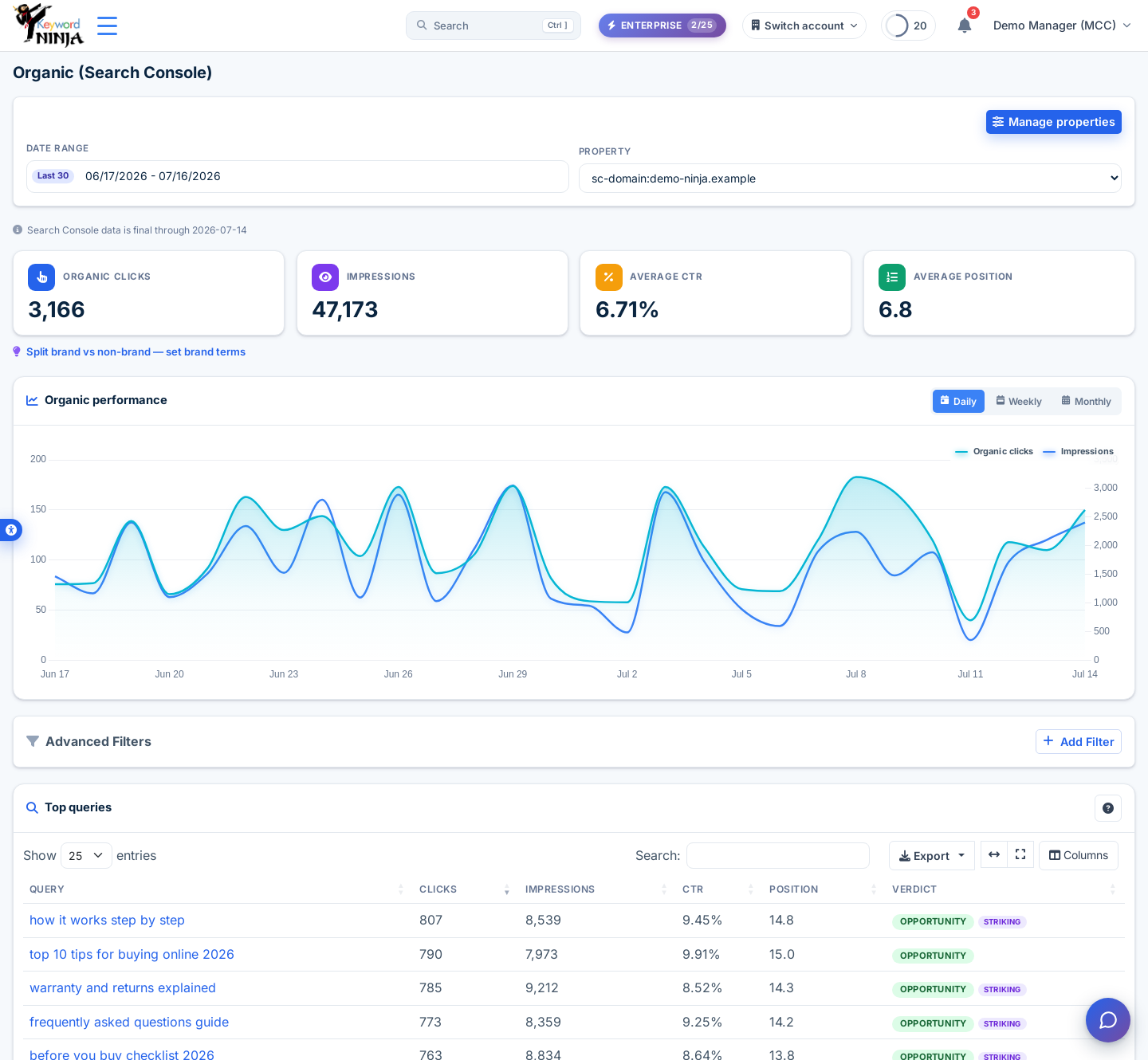
4. Read the Organic overview
/dashboard/gsc shows your organic clicks, impressions, average CTR, and average position for the selected date range, plus a daily trend chart. Below that, the Top queries table lists your best organic queries with a Verdict column (calling out “Opportunity” and “Striking distance” queries at a glance), and a Top pages table shows which of your organic-winning pages are (or aren’t) currently used by any ad.
5. Use Paid vs Organic to find savings
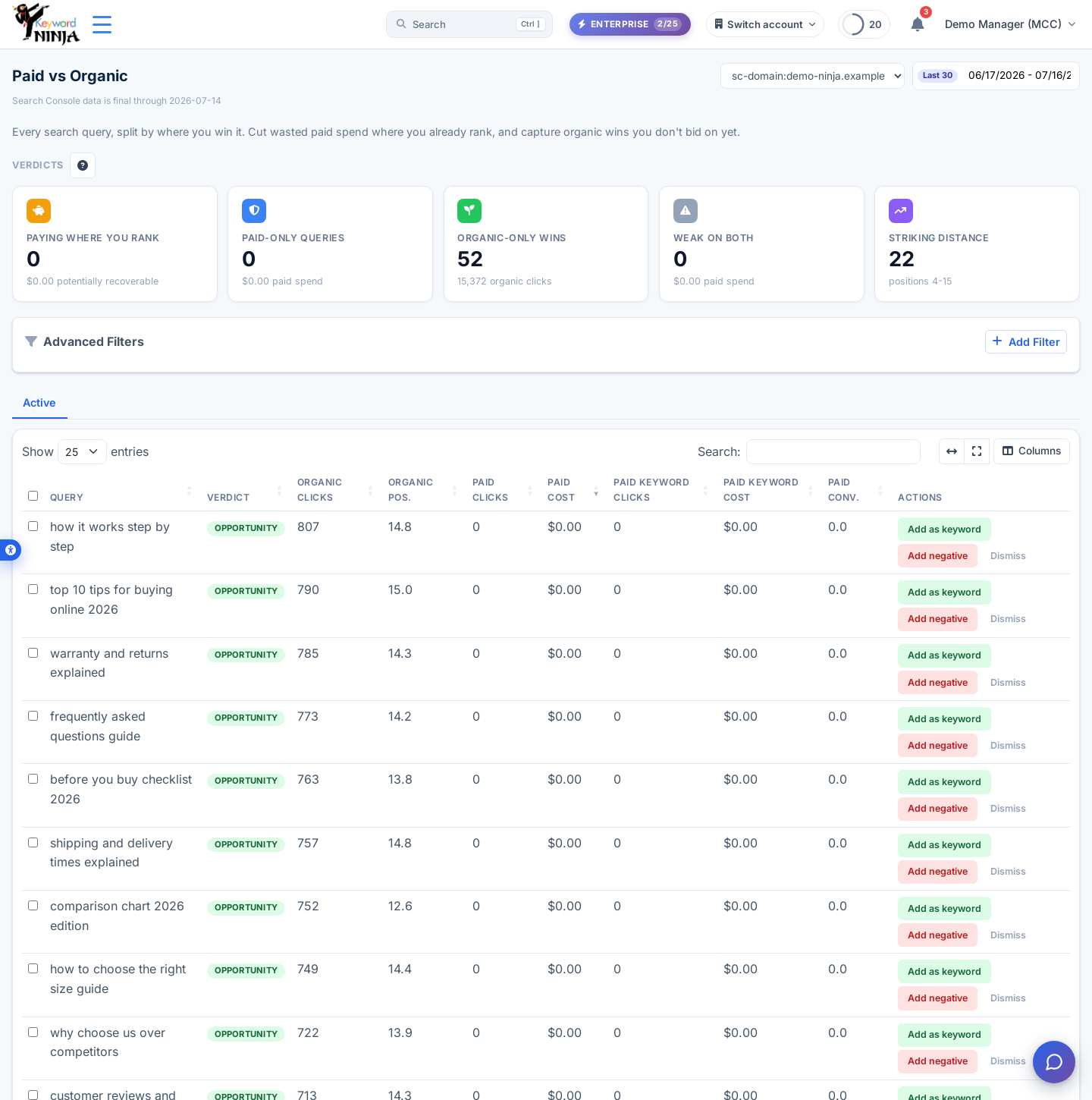
/dashboard/paid-organic is where the real decisions happen. Every query is bucketed into a verdict: Paying where you rank (you’re already ranking well organically for a query you’re also paying for - the money on the table), Paid-only, Organic-only wins, Weak on both, and Striking distance (positions 4-15, worth pushing). If more than one of your Google Ads accounts advertises the same site, an account switcher lets you flip between them.
For any “Paying where you rank” query, click Add negative to stop paying for it - the action goes through the same Change Log as everything else in Keyword Ninja, so it’s fully undoable. Click Dismiss on any query you’ve already decided not to act on.
Tips & best practices
- Organic context shows up in more places than these two pages. Once connected, you’ll see it in Quick Wins, the keywords page’s “Organic pos.” column, keyword-ideas chips seeded from your top organic queries, the N-gram analysis organic source toggle, the weekly AI narrative, and reports.
- The 2-3 day lag is normal, not a bug. If a property’s numbers for the last day or two look thin, that’s Google Search Console itself still finalizing data - it’ll fill in on the next sync.
- Disconnecting doesn’t delete your history. Pages keep showing your last-synced data behind a “frozen” banner. Recommendations, quick wins, and the narrative stop drawing on organic data immediately, since those specifically require an active connection.
- Set your brand terms. The overview page can split brand vs non-brand queries once you’ve set brand terms for the property - useful for separating “people searching your name” from genuine non-brand opportunity.
Troubleshooting & FAQ
The property picker is empty. Your connected Google account has no verified properties in Search Console - verify a property there first (Search Console → Settings → Ownership verification), then reopen the picker.
Paid vs Organic shows “not_mapped.” The property isn’t mapped to a Google Ads account (auto-match couldn’t find exactly one candidate). Map it from the Settings card’s property list, or the map control on the page itself.
It’s asking me to reconnect. Your Search Console token expired or was revoked (password change, access review, etc.) - click Reconnect and go through consent again. Your Google Ads connection is completely separate and is never affected by this.
Yesterday’s numbers changed since I last looked. Expected - Google revises the last couple of days of Search Console data as it finalizes, and Keyword Ninja’s daily sync picks up the revision automatically.
Can I connect a different Google account than my Ads login? Yes, intentionally - the GSC grant is a separate, read-only connection from your Ads connection, so your SEO/webmaster account and your ads account never need to be the same login.